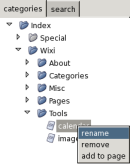
deleting a page can be done by the category tree. Right-click on a page and
select the remove option. The page will still be existing in de database but can only
be seen in the special RemovedPages folder. To delete it completely from your wiki
database you have to go to the settings dialog and select
the delete history button.
example
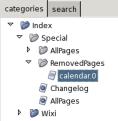
If you exidently removed the wrong page, its always possible to restore a deleted page. You have to go to the special RemovedPages folder and select the page you want to recover. After you loaded the page you can now save it again. Note that you have to rename the page because a number has been appended to its title.
example