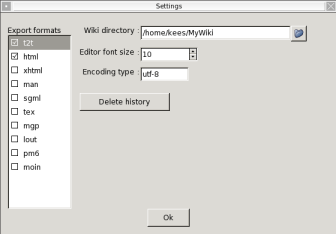
Thanks to txt2tags Wixi supports a lot of formats in which you can export pages. Select one more or formats in the configuration panel. You can choose from HTML, XHTML, SGML, Latex, Lout, Man page, MoinMoin, MagicPoint and PageMaker. The exported formats are saved in the the Wiki directory. Note that exporting is only done when a page is saved.
This is the directory containing all the wiki sqlite files. You may change it if you want to locate your wiki files in an other directory.
This wil adjust the size of the font used by the editor.
Wixi should be able to display characters used by i.e. Japanese people. By standard, wixi uses the utf-8 codec which should be able to display most of the characters. Other codecs can be set in the encoding type line.
When editing pages, all of the previous changes are saved in the database. This is usefull for restoring or comparing pages. If you want to delete all of its historical information, press the Delete history button.